Every meaningful image should have alternative (alt) text. Alt text is a text-based description of an image. Alt text should be concise and describe the content and context of an image. It serves as a text equivalent for users who cannot see the image or when it fails to load.
Alt text is crucial for accessibility and ensures that all users can understand the content of the image. In most cases, alt text is required for content that contains images. The Title II regulations require that organizations follow the Web Content Accessibility Guidelines (WCAG) version 2.1 standards. Providing alt text is a requirement under the accessibility standard.
How to write effective alt text
- Be concise but descriptive (keep under 125 characters as a best practice).
- Do not use phrases like “image of” or “picture of” (screen readers announce it automatically as an image).
- If the image conveys important data, describe the key points.
- Ensure the text can be understood without additional context.
- If the image is also a link, the alt text should describe the link target.
- If the image contains text, include it in the alt text. If the image is already described in the surrounding text, don’t include alt text.
- If an image is purely decorative, don’t add alt text. Mark it as decorative.
Example photo and alt text:

Good alt text: Truman the tiger playfully poses with a student in front of the columns at Mizzou.
Why this works: The alt text succinctly explains the content in the image and the emotion conveyed.
Poor alt text: Photo of Truman and student
Why this doesn’t work: The alt text doesn’t explain who Truman is, where the photo takes place or any additional context. Including “photo of” is unnecessary and repetitive since a screen reader will indicate the file is an image.
Avoid using images that contain text
This includes invitations, flyers, infographics, PDFs and more. Images containing text often fail to meet accessibility guidelines and do not scale well on mobile devices.
To follow accessibility guidelines, Digital Service recommends that images with text should be avoided except for a few specific exceptions.
- Graphics with combined image and text are only allowed if they have minimal text. For example, a header with a picture of Memorial Union in the background and the name of the newsletter would be acceptable.
- Remember, all text in the graphics should be included in the alternative text. This will be difficult to do if there is substantial text in the image.
Digital communications and print communications are not the same. If content providers send you graphics to include in your newsletter — whether it’s a flyer or image from a PowerPoint slide — that don’t meet these guidelines, ask them to provide the picture or graphic without text, or text separately. When working in DotDigital, you can then format the individual pieces of content as different components, such as images, headlines and text.
Example of inaccessible newsletter graphic
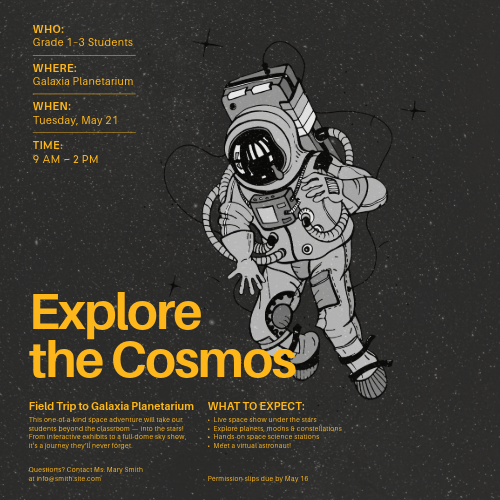
Why is it inaccessible?
- Includes small and illegible text
- Conveys too much text to be included in alt text
- Text is placed over the astronaut
- The contrast between the text and the starry background could present a challenge for those with visual impairments
Example of accessible newsletter graphic

Why is it accessible?
- Includes minimal text with an increased font size
- Additional details have been removed and can be included in the text accompanying the image.
- Text does not appear over the astronaut and the starry background has been removed. This improves color contrast, making it easier to read and accessible for screen readers.
Best practices to consider
- Avoid collages when possible. Instead, present individual images with separate, meaningful alt text.
- If a collage must be used:
- Provide a caption or linked extended description (e.g., on a separate webpage).
- Keep alt text brief, and direct users to more information if needed.
- Example Alt Text for a Collage: “Collage of student life at Mizzou. Includes events, campus scenes, and group activities. Full description at [link].”
Do all images require alt text?
No. According to WCAG, images are either meaningful or decorative.
- Meaningful: Include alt text.
- A meaningful image presents concepts, data or details that are not fully conveyed by the surrounding text.
- Decorative: Hide from screen readers (e.g., use
alt=""). Check your authoring tool for the correct way to do this.- A decorative image is an image that provides no additional content or information to the user. They don’t add to the understanding of the webpage’s content and are often used for visual styling.
| Alt Text Required (meaningful images) | Alt text NOT Required (decorative images) |
|---|---|
| Logos | Images used for visual styling |
| Graphs | Illustrative images |
| Charts | Images that are redundant with nearby text |
| Diagrams | Background images |
| Maps | Spacer images |
| Icons | Stock images |
| Images with text | |
| Images used in Links and Buttons |
How do I decide if an image is meaningful or decorative?
A good question to ask yourself is: “If the image were removed, would the user lose essential information?” If the answer is no, then the image is likely decorative. If yes, the image is likely meaningful.
The Web Accessibility Initiative (WAI) has published a decision tree designed to assist authors in determining if an image is meaningful or decorative.
What do I do if an image is too complex to fit in a sentence or two?
Provide the complete description in a linked document. For detailed guidance on writing descriptive alt text for complex diagrams, infographics and STEM materials, see Best Practice for Writing Alt Text for Complex Images (PDF).
How do I add alt text in the following platforms?
The process of adding alt text can vary from platform to platform. See the following resources to learn how to add alt text in commonly used tools.
- Microsoft Office 365
- Microsoft Power BI
- WordPress
- Adobe InDesign
- Qualtrics
- TDX Knowledge Base articles
Alt text Guidelines
- Be concise – No longer than a sentence or two.
- Be descriptive – Only focus on the details that matter. What do you expect visual users to get out of the image?
- Alt text should support the surrounding text.
- Don’t use “Image of …” in your alt text.
- If the image is also a link, the alt text should describe the link target.
- If the image contains text, include it in the alt text. If the image is already described in the surrounding text, don’t include alt text.
- If an image is purely decorative, don’t add alt text. Mark it as decorative.
For examples of alt text, visit: